Skip to content
-
Subscribe to our newsletter & never miss our best posts. Subscribe Now!
digitalnewsservices.com
  • Home
  • Linux
  • Git
  • Docker
  • Jenkins
  • Kubernetes
  • DevOps Projects
  • Home
  • Blog
  • Home
  • Linux
  • Git
  • Docker
  • Jenkins
  • Kubernetes
  • DevOps Projects
  • Home
  • Blog
Close

Search

  • https://www.facebook.com/
  • https://twitter.com/
  • https://t.me/
  • https://www.instagram.com/
  • https://youtube.com/
Subscribe
digitalnewsservices.com
  • Home
  • Linux
  • Git
  • Docker
  • Jenkins
  • Kubernetes
  • DevOps Projects
  • Home
  • Blog
  • Home
  • Linux
  • Git
  • Docker
  • Jenkins
  • Kubernetes
  • DevOps Projects
  • Home
  • Blog
Close

Search

  • https://www.facebook.com/
  • https://twitter.com/
  • https://t.me/
  • https://www.instagram.com/
  • https://youtube.com/
Subscribe
Home/Git/Introduction to Git & Version Control
Git

Introduction to Git & Version Control

By Sumit Sharma
April 20, 2026 3 Min Read
0
Git Mastery Series

Introduction to Git & Version Control

Think Like a DevOps Engineer: Never Lose Your Code Again

1. Intro: Git Kya Hai? (ELI5)

Think of Git as a “Time Machine” for your code. Or even better, a “Save Game” button. Every time you make progress, you save it. If you mess up later, you can teleport back to your last save.
Maan lijiye Git ek “Time Machine” hai aapke code ke liye. Jaise video games mein hum checkpoint par game “Save” karte hain taaki marne ke baad wahi se shuru kar sakein, Git bhi wahi kaam karta hai.

Real DevOps Examples of Git:

  • Automated Rollbacks: Agar naya code deployment server crash kar de, toh Git se purana version turant wapas la sakte hain.
  • Multi-Feature Development: Ek team login page bana rahi hai, dusri payment page—bina ek dusre ka code kharab kiye.
  • Audit Trail: Ye pata lagana ki 6 mahine pehle line number 45 kisne aur kyun badli thi.
  • Code Review: Senior engineer check kar sakta hai ki Junior ne kya change kiya hai bhejane se pehle.
  • CI/CD Trigger: Jaise hi aap Git par code push karte ho, Jenkins/GitLab apne aap test aur deploy shuru kar deta hai.

2. What is Version Control?

Bina Version Control ke, developers aise files rakhte the: final_code.zip, final_code_v2.zip, final_code_pakka_final.zip. Yeh nightmare hai! 😱

Version Control System (VCS) tracks every single change in your project files. It tells you Who, When, and Why a change was made.
Version Control ek aisa system hai jo aapke project ki history maintain karta hai. Ye har ek “Fullstop” aur “Comma” ka hisab rakhta hai.

3. Git vs GitHub vs GitLab (Sabse Bada Confusion)

Log aksar sochte hain ki ye sab ek hi hain, par aisa nahi hai.

G
Git: Ye ek tool (software) hai jo aapke computer par chalta hai version control karne ke liye. (Ye “Engine” hai).
H
GitHub/GitLab: Ye cloud platforms hain jahan aap apna Git code online store karte ho taaki team collab kar sake. (Ye “Cloud Garage” hai).

👉 Real DevOps me ye daily use hota hai: Git se hum local kaam karte hain aur GitHub/GitLab se automation (CI/CD) pipelines chalate hain.

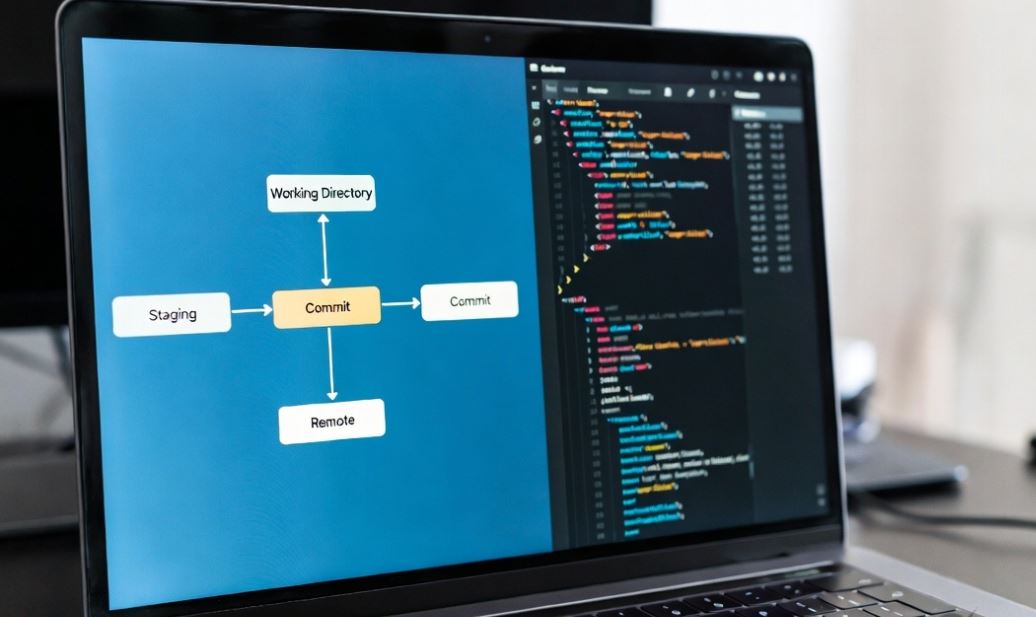
4. Git Workflow (DevOps Standard) 🔄

Yahan log sabse zyada galti karte hain. Git ka flow samjho:

1. Working Directory: Jahan aap apna code likh rahe ho (Unsaved changes).
2. Staging Area: Ye ek “Waiting Room” hai. Aap chun-te ho ki kaunse files save hone layak hain.
3. Local Repo (Commit): Aapne checkpoint “Save” kar diya (Aapke computer par).
4. Remote Repo (Push): Aapne apna code internet (GitHub) par bhej diya taaki duniya dekh sake.

5. Real-World Scenarios 🔥

Scenario 1: Solo Developer

Sumit ek website bana raha hai. Kal usne Login page banaya (Version 1). Aaj usne naya design dala par website toot gayi!

Without Git: Sumit ko purana code yaad karna padega ya manually theek karna padega.

With Git: Sumit bas ek command chalayega aur “Version 1” par wapas chala jayega. Problem Solved!

Scenario 2: Team Collaboration (At a Real Company)

Ek company mein 3 log ek hi app par kaam kar rahe hain.
– Dev A: Profile page badal raha hai.
– Dev B: Payment gateway fix kar raha hai.
– Dev C: Background color change kar raha hai.

Problem: Agar ye ek hi file par kaam karein bina Git ke, toh ek ka code dusre ko overwrite kar dega.

Solution: Git “Branches” ka use karta hai. Sab apna alag kaam karte hain aur baad mein Git sabko intelligently “Merge” kar deta hai.

⚠️ Common Mistakes & Fixes

Mistake 1

Overwriting Code: Bina update liye naya code push karne ki koshish karna.

Fix: Hamesha apna kaam shuru karne se pehle git pull karein taaki team ka latest code aapke paas ho.

Mistake 2

Losing Changes: Commit karna bhul jana aur computer crash ho jana.

Fix: “Commit early, commit often.” Chote-chote changes par save karte rahein.

Mistake 3

Sensitive Data Leak: Galti se Password ya API keys GitHub par push kar dena.

Fix: .gitignore file ka use karein taaki sensitive files Git track na kare.

Summary: Key Takeaways 🎯

1. Git ek Distributed Version Control tool hai.
2. Ye history maintain karta hai aur team collab asaan banata hai.
3. Git software hai, GitHub cloud hai.
4. DevOps mein Git hi CI/CD pipeline ka “Source” hai.

Agle chapter mein hum actual Git Commands seekhenge! Stay tuned.

Author

Sumit Sharma

Follow Me
Other Articles
Previous

Multi-Domain Hosting on One Linux Server

Next

DevOps : Git Installation & 10 Real Projects

No Comment! Be the first one.

Leave a Reply Cancel reply

Your email address will not be published. Required fields are marked *

Recent Posts

  • Dockerfile — Build Production-Ready Images Like a DevOps Engineer
  • Docker Images & Containers
  • Docker Introduction — Learn Containers with Real DevOps Projects (Beginner to Advanced)
  • Git Branching & Team Collaboration — Work Like a Real DevOps Engineer
  • Remote Repositories & Cloud Workflow

Recent Comments

No comments to show.

Archives

  • April 2026

Categories

  • Docker
  • Git
  • Linux
  • Uncategorized
Copyright 2026 — digitalnewsservices.com. All rights reserved. Blogsy WordPress Theme